

Resource Profile:
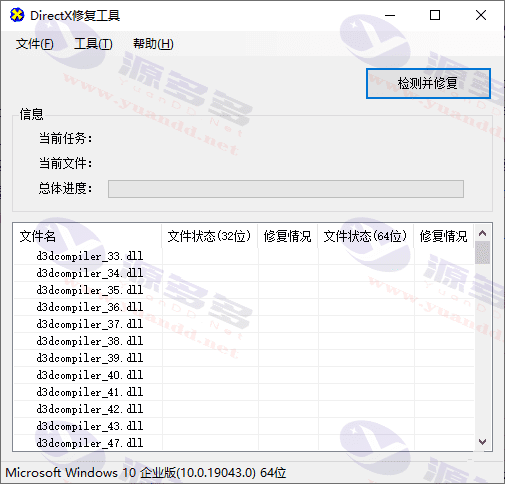
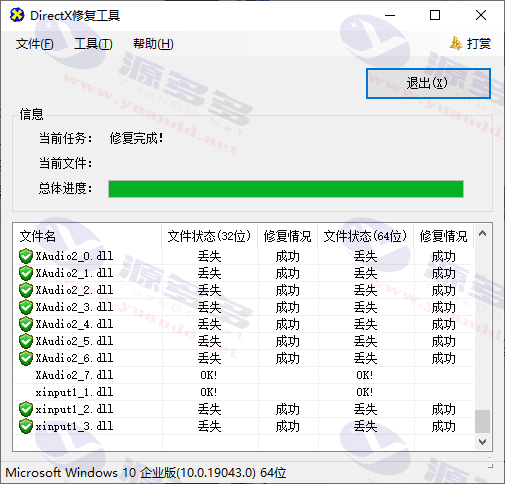
DirectX FixesDirectX Repair is a lightweight and practical system repair software that requires no installation and can be run directly from the green version. Its core function is to automatically detect and repair the abnormal state of DirectX and VC++ components in the system, especially suitable for solving common problems.0xc000007b errorThe software will automatically check, repair, download and register the program without manual intervention, greatly simplifying the process. Users only need to click the “Detect and Repair” button, the software will automatically complete the verification, repair, download and registration operations, eliminating the need for manual intervention, greatly simplifying the operation process.
The software is mainly oriented towards checking and repairing DirectX components in your system, specially designed to resolve 0xc000007b errors and includes the latest version of DirectX redist (Jun2010), all files are digitally signed by Microsoft to ensure safety and reliability. In addition, DirectX Repair Tool is compatible with several Windows versions, including Windows XP, Vista, 7, 8, 8.1, 10 and 11, supports both 32-bit and 64-bit operating systems, and is able to automatically adjust the repair mode according to the different systems without user settings.
The Enhanced Edition also provides fixes for C++ components. As many software runs depend on C++ libraries, missing or abnormal C++ components often lead to 0xc000007b errors. The program not only repairs DirectX components, but also automatically updates the C++ library files required by the system, which greatly improves the repair success rate. v3.2 onwards, a brand new C++ extension package has been introduced, which further optimizes the repair capability of industrial software. Especially when the C++ component is abnormal, the enhanced version will provide a powerful repair mode to improve the repair effect.
In addition, DirectX Repair Tool supports command line operation, which allows users to set the language, adjust the window mode, configure the security level and other operations through the command line interface, which greatly enhances the flexibility. For older Windows versions, users need to make sure that .NET Framework 2.0 or higher is installed on the system, while other Windows versions can run the program directly.
For the common 0xc000007b error, DirectX Repair Tool provides users with a simple and efficient solution. Problems with the operation of games and industrial software often stem from missing or corrupted DLL files, especially components related to DirectX 9.0 and Visual C++ Redistributable Package. Whether you are using a 32-bit or 64-bit operating system, you need to install the complete DirectX and C++ library files, and the key to solving this problem is to install both 32-bit and 64-bit components.
All in all, DirectX Repair Tool provides a convenient solution for the majority of Windows users to help fix various problems caused by missing or damaged components in the system, especially when running games or industrial software.
Photo Gallery:


- Can free downloads or VIP member-only resources be commercialized directly?
- The resources on this site are collected and organized through the network, for personal research and study purposes only. The copyright belongs to the legal owner of the software and program code, users should verify the copyright and legality of the resources, prohibited for commercial use, illegal activities or any violation of national laws and regulations.
- Disclaimer of liability for program or code bugs, compatibility issues or functional defects, etc.
- As the resources on this site are collected and organized through the network, not the site's original, it can not fully guarantee its functionality or code compatibility. Users need to verify whether the resources meet the needs of their own, due to the following circumstances lead to losses, this site does not assume any responsibility:
Programs, source code and other computer software resources may contain code vulnerabilities (bugs), compatibility issues or functional defects left by the developer. This site does not provide free repair services for such technical defects, users need to bear the risk of debugging, modification or abandonment of the use.